
Modules
Data Analyst
Data Engineer
Product Data Scientist
AI Engineer
Machine Learning Engineer
Prompt Engineer
The LAG() function is a function that allows you to access a value in a line preceding the line currently being considered.
This row can be the “exact” previous one (the one just before), or a certain it can shift a certain number of rows (like 3, 4 or 5 prior to that current row).
You guessed it! The LEAD() function works in the same way as the function LAG() except for the order: it will look at the following line instead of the preceding ones.
Let's visualize these 2 functions with an example:
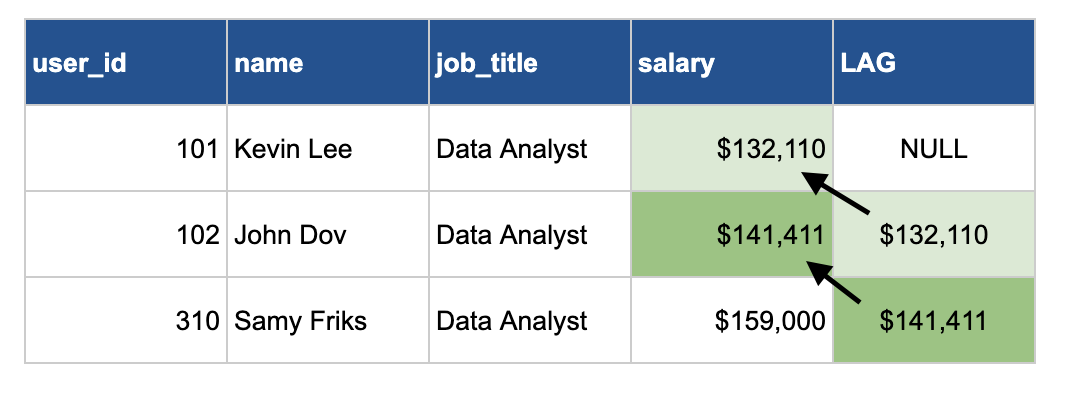
We have the salaries table that has these columns (user_id, name, job_title and salary). And we want to use the lag function and order that by salary (with the lowest salary first).
As we can see here, for Kevin Lee, first row, there is no value prior to that, so the LAG value will be null. For John Dov, second row, his salary is 132,110. So the LAG function will grab the value of the previous row, from Kevin's Lee salary. Same for that 3rd row, it will grab the value of John Dov's salary.
In SQL, it will look like this:
SELECT
    user_id,
    name,
    job_title,
    salary,
    LAG(salary) OVER(ORDER BY salary) AS lag
FROM salaries
The big difference with the ranking function is you need to specify the column that you want to look at. And also order by so that the window function know the order to look at to grab the prior value. If you want to look at 2 values prior, you simply need to add a parameter to the LAG function.
LAG(salary,2) OVER(ORDER BY salary) AS two_value_prior
The lead function is doing pretty much the same. It's just instead of looking prior it will look at the following row.
The BIG question is:

In a lot of companies, analyzing trends over time is so important. 2 common comparisons are MoM (month over month) and YoY (year over year). To do this, we often use LAG functions. These functions are also really useful for comparing current values with those from exactly a week ago - simply by looking at data from 7 days prior.
Also, if you're preparing for job interviews, keep in mind that many companies like to ask questions about these topics.
Now that you care (a lot more) 😄, let's practice!